.svg)


A Modern Guide to Sales Incentive Automation for RevOps Teams

Managing incentives and commissions manually is a time-consuming and thankless task. If you get everything right, the payments go out, and no one really notices. But make a mistake, and you get pulled into endless email threads and have to spend even more time unpicking your spreadsheets to find and fix the issue.
RevOps teams spend hours every month on spreadsheet calculations that still result in errors, disputes, and delayed payouts. To save time and improve results, forward-thinking teams are switching to sales incentive automation, using technology to handle some of their time-consuming manual compensation processes. But to implement these tools successfully, you first need to understand what’s being automated, and how.
Key Takeaways
- Sales incentive automation uses technology to automate manual processes, such as commission calculations and processing payments.
- Look out for broken spreadsheets and growing numbers of commission errors. These signs indicate your RevOps team is struggling with manual processes that you could automate.
- Start by automating high-pain and high-frequency manual tasks, so you see the biggest benefits quickly.
- When comparing automation vendors, look for tools with the right level of flexibility, deep integrations, and implementation support so you can find the right fit for your business needs and experience.
What Sales Incentive Automation Actually Means
Sales incentive automation uses specialist technology to manage and optimize your commission and compensation processes. Instead of manually running calculations, checking and approving payments, and handling payouts, commission software and other sales tech automate these processes. Here are a few processes that sales incentive automation can handle.
Automated Commission Calculations
Right now, your commission calculations are probably built in spreadsheets that are complex and incredibly fragile. A single change can throw up formula errors that take ages to unpick, making it time-consuming and frustrating to change any aspect of your commission structure.
Sales commission automation software lets you automate these commission calculations. You define clear rules for different tiers, accelerators, and clawbacks once, then the system applies them consistently. The software handles complex calculations in seconds, even when reps cross thresholds or deals get adjusted. This eliminates manual intervention, rework, and last-minute adjustments before payroll, and reduces disputes due to calculation errors.
Approval Workflow Automation
When you handle incentive approvals manually, you can get buried in never-ending email chains with no clear sign-off. Tiny changes to incentive plans are hidden in complex spreadsheets, so it’s hard to be sure the right people have seen and approved them.
Workflow automation involves building structured, multi-level approvals directly into the commission process, providing a single source of truth for incentive reviews and sign-off. Admins map approvers by role, deal size, geography, or product line, and the system triggers reviews automatically. Managers leave comments and approve or reject changes inside the platform, and corrections flow back into the system without exporting a single spreadsheet. This helps you get faster sign-off with no more confusion over conflicting spreadsheet versions.
Payout Processing and Reporting
Running payments manually opens the door for human error. Finance teams could use an old version of your commission spreadsheets, or someone could make a mistake entering crucial data into the accounting system.
Automation generates payout files automatically and pushes them to payroll or accounting systems without your team needing to do a ton of manual formatting or rework. You can use the same data to create real-time dashboards that update as soon as deals close or commission splits are adjusted.
Automating payout processing gives finance teams clear audit trails with calculation logic and approvals tied to every payout. It also gives reps visibility into their earnings, accelerators, and progress toward quotas, which builds trust and helps keep sellers motivated.
Why RevOps Teams Need Automation Now
Managing commissions manually is time-consuming and complex, and the work and costs involved only compound as teams grow. As companies (and sales teams) scale, there are several clear signs that RevOps teams need to automate those time-sucking manual processes.
The Spreadsheet Breaking Point
Companies often start by managing commission structures in spreadsheets. But as businesses grow, those spreadsheets become more complex — you add new territories, products, plan structures, tiers, and sellers. Then, as team structures and numbers change, the spreadsheets need constant updating, which doesn’t take long for small teams, but takes much longer the more people and products are involved.
With a 10-person team, that spreadsheet is manageable, but for a 100-person team, the spreadsheet becomes a sprawling nightmare. Tiny changes take hours to check and implement, and small tweaks can break formulas, then take ages to track down and fix. When your spreadsheets can’t keep up with your team’s commission needs, it’s time to start automating instead.
The Hidden Cost of Commission Errors
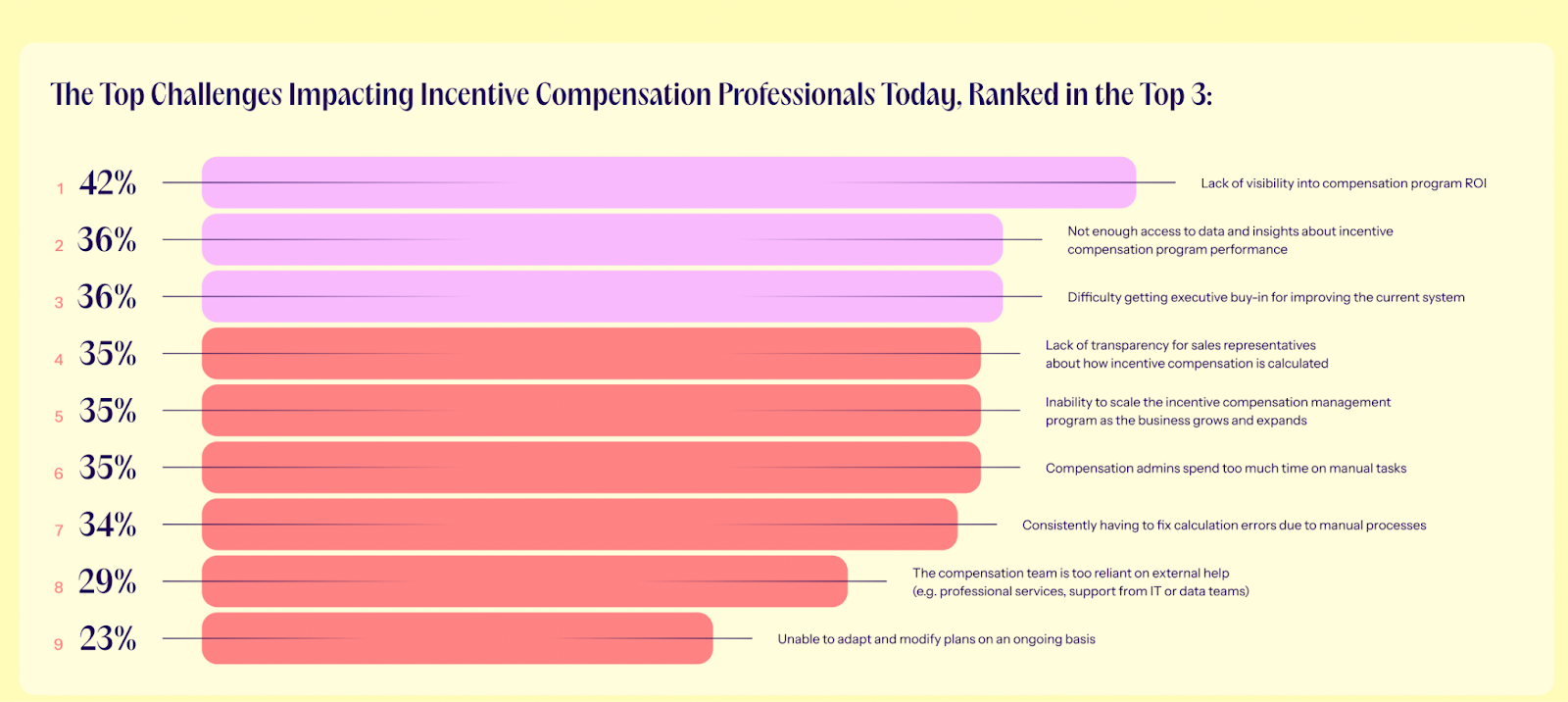
Commission errors and disputes damage trust between sales and finance teams. Our research found that 34% of compensation professionals struggle because they are “consistently having to fix calculation errors due to manual processes.”
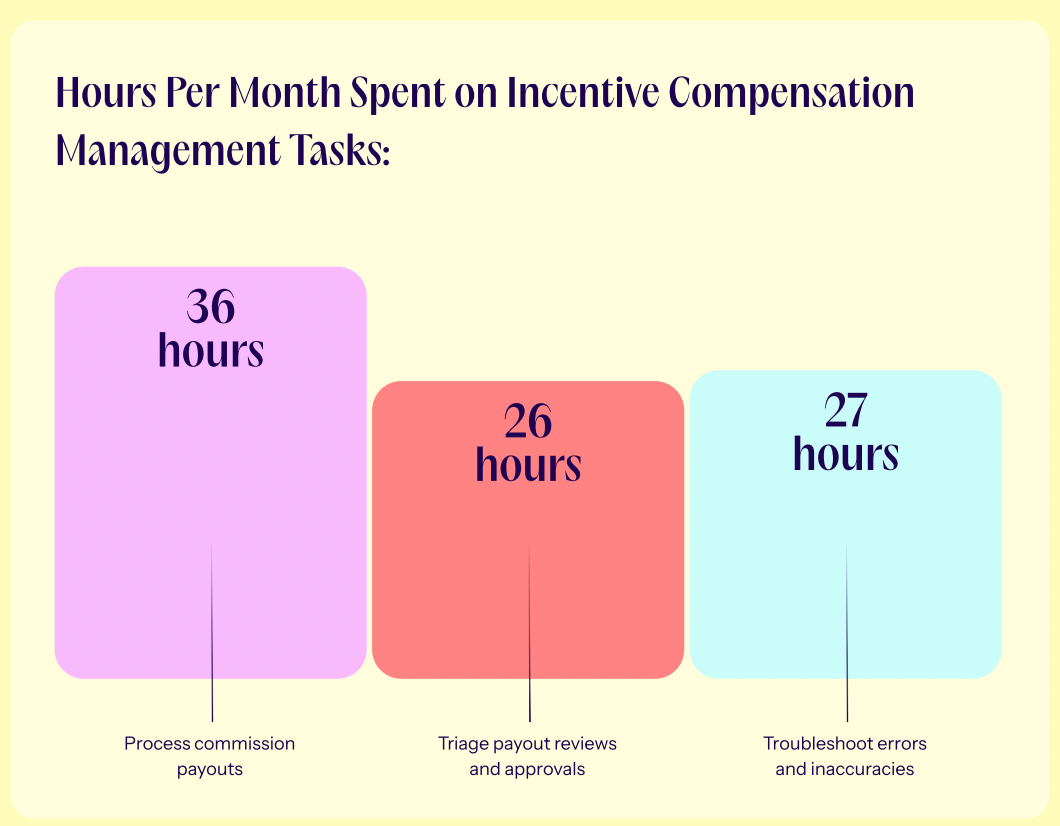
Seemingly small mistakes snowball into bigger problems as sellers lose motivation and their productivity drops, and RevOps leaders lose around 27 hours per month identifying and correcting calculation errors.
The Integration Imperative
If your commission tools don’t integrate with your CRM, ERP, CPQ, or billing tools, then you have to spend time copying data from one tool to another. This takes up a lot of time and increases the risk of manual data errors. Integrated tools mean your data flows automatically from your sales and billing tools into your commission system, so sales leaders can spend less time inputting or checking data.
If your RevOps stack is littered with disconnected tools, that’s a clear sign to look for a better-connected system to help automate some of those manual data transfers and calculations.
What to Automate First
Start by automating the manual processes that take up the most time, most often. Look out for these high-pain, high-frequency tasks that will bring noticeable benefits to your teams.
Commission Calculations
Many RevOps teams start their automation journey with commission calculations because it’s a time-consuming task that causes headaches every pay period. Manual commission calculations are run on complex spreadsheets that break every time a plan changes. Automation replaces fragile formulas with a centralized rules engine that enforces pay rules consistently across reps, regions, and products. You can define tiers, accelerators, splits, and clawbacks once, and let the software execute them every pay cycle.
Automating these high-frequency calculations delivers immediate, visible ROI: You see fewer disputes, faster closeouts, and less manual work. Tools like CaptivateIQ’s SmartGrid™ let you model complex plans visually, test scenarios, and push accurate results into approvals and payouts.
Real-Time Earnings
RevOps teams can use automation to give sellers real-time earnings visibility, so they can see exactly what they’ve earned as soon as their latest deal closes.
Giving reps this visibility stops “shadow accounting,” where they track their earnings in personal spreadsheets. Our research found that 85% of employees manually recalculate commissions at least some of the time. But these sheets can quickly drift away from reality, especially when they fail to take into account different tiers, accelerators, or clawbacks that might affect their earnings, causing disputes and disappointment at payout time.
Dispute Resolution Workflows
Payout disputes drain time and erode trust between sellers, leaders, and finance, so automating this early can save a lot of headaches. An automated workflow cuts the volume of back-and-forth emails, reducing rep frustration and helping teams resolve disputes faster.
To automate this process, use a centralized system where reps submit issues through a form tied to the underlying deal or rule, and the platform automatically routes them to the right owner.
How to Evaluate Automation Solutions
There are lots of tools out there that claim to help you automate manual processes, but not all automation solutions are equal. These criteria will help you spot the tools that will be the best fit for your business.
Plan Flexibility vs. Template Constraints
When evaluating automation tools, start by looking at how flexible they are: whether you’re limited to pre-built templates or have the freedom to build what you like.
Some sales incentive automation tools offer templates that help you quickly build compensation plans using common structures. Others give you the flexibility to build a plan from scratch, including any tiers, splits, accelerators, clawbacks, or adjustments you like.
The right choice for your business depends on your commission complexity. If your plans are straightforward and rarely change, tools with templates are a great choice and help you get started quickly. But if you run multi-tiered, multi-product, or dynamic commission structures, you need more freedom and flexibility. Understanding this up front helps you avoid choosing a tool that boxes you in with too-rigid structures or overwhelms you with too many options.
Integration Depth
Look closely at how deeply the tool integrates with your existing systems. A solution with robust connections to your other tools ensures commission calculations are based on the latest, most accurate data without extra work, reducing errors and disputes. The more granular the integration, the less manual data cleanup and re-entry your team needs to do.
Shallow integrations only pull basic opportunity data, forcing you to reconcile spreadsheets or manually correct errors. Deep integrations mean the tool syncs at the field level with your CRM, capturing custom fields, product codes, discounts, deal stages, and adjustments automatically. A simple test would be to change a product or credit split for a deal in your CRM. If you see that change automatically reflected on your incentive automation tool, you’ve got a deep integration, whereas if you need to make that change manually, it’s only a shallow one.
Implementation and Adoption Support
Implementation and adoption support is also essential, as strong support will help your team get started quickly and minimize disruption to daily operations. Ask how long onboarding takes, what training resources are included, and whether the vendor provides a clear rollout roadmap.
Look for vendors that offer change management support and role-based training. Different users will need to understand different parts of the platform: Admins need deep configuration workshops; finance and ops need reconciliation and audit walkthroughs; reps need simple, goal-focused dashboards and bite-sized training and on-demand content.
FAQs
How long does it take to implement sales incentive automation?
Implementation typically ranges from a few weeks to a few months, depending on plan complexity and data readiness. Tools with prebuilt integrations and templates accelerate setup, while highly customized plans require more configuration and testing. A clear roadmap, pilot program, and dedicated support team help keep timelines predictable.
What data do I need before automating commissions?
At a minimum, you need historical deals, crediting rules, plan definitions, and employee assignments. Integration with your CRM and ERP ensures fields like opportunity stage, product, region, and adjustments are captured accurately. Clean, complete data reduces errors and accelerates deployment.
Can automation handle complex commission structures?
Yes, modern automation systems are designed to model multi-tiered plans, retroactive accelerators, splits, and clawbacks without manual recalculation. Rule-based engines enforce consistency and automatically adjust payouts as deals change. This eliminates errors and saves hours of spreadsheet management.
How do I get reps to trust automated calculations?
Transparency is key: Provide real-time dashboards and detailed payout breakdowns. Link each payout to the underlying deals and rules so reps can see how numbers are calculated. Over time, reps will see fewer errors and disputes over commission calculations, which helps build trust in the long term.
Make Automation Work for Your RevOps Team
Sales incentive automation eliminates the manual work that keeps RevOps teams from higher-impact strategic projects. When you begin automating your manual processes, start with a high-frequency task that requires lots of manual data entry and reviews, such as commission calculations. CaptivateIQ Incentives simplifies the commission management process for RevOps teams by automating data entry and incentive calculations. Book a demo to learn more.
_1200x630.png)