
.svg)


What's New at CIQ: September 2026

Every six weeks, we ship new ways to help your team plan smarter, pay faster and operate with more confidence. Here’s what’s new this cycle from CaptivateIQ.
CaptivateIQ Incentives
A New User Interface Experience – Default When You Log In (Open Beta)
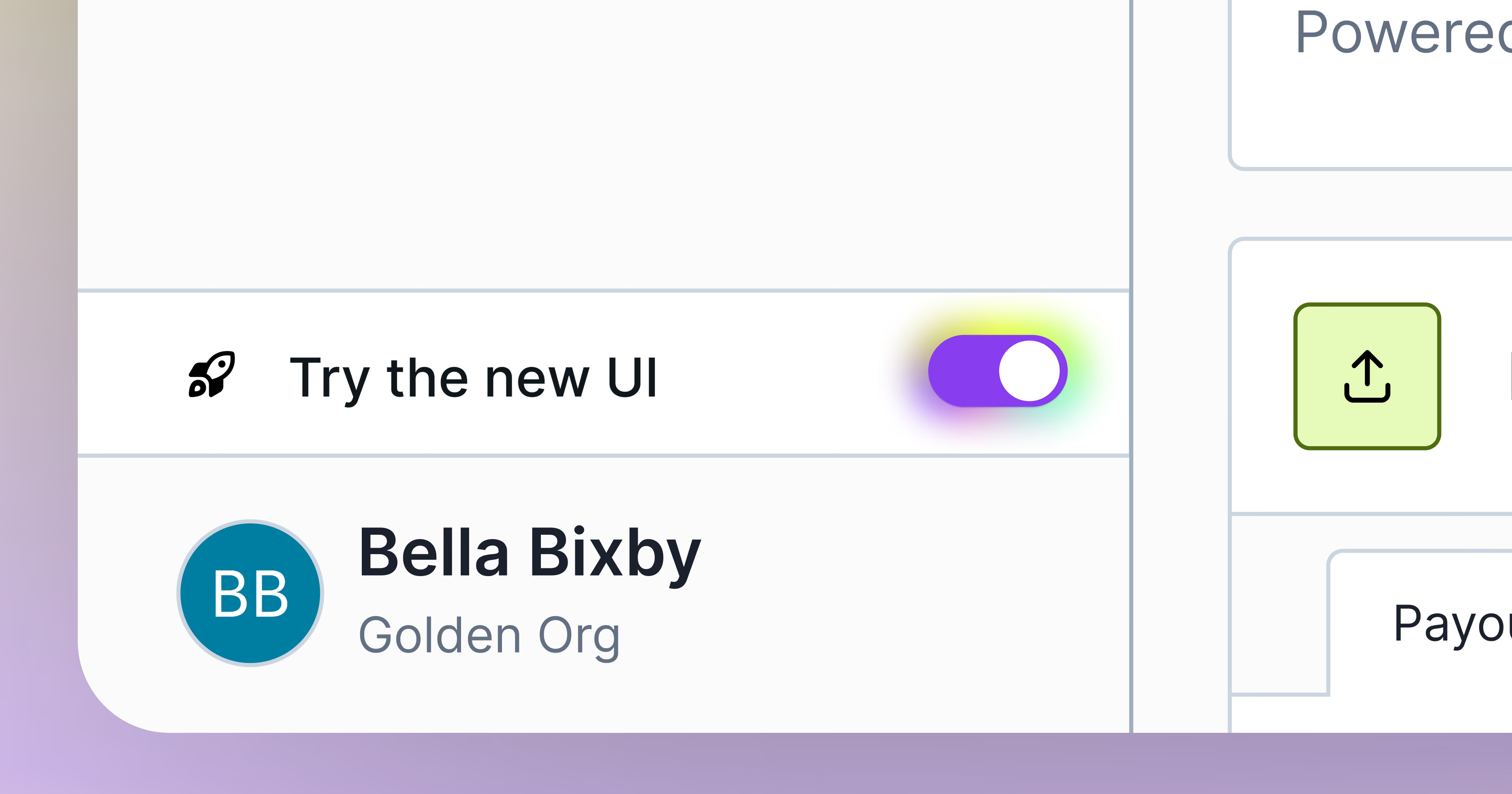
Last release cycle, we unveiled a fresh, new look for CaptivateIQ Incentives as part of our open beta. This refresh includes an updated layout, visual theme, and dashboard along with structural upgrades that make plan building faster – available via the "Try the new UI" toggle in your account.
Starting today, the new UI experience becomes the default when you log in to your CaptivateIQ instance. You can still switch back to the classic view by visiting Profile Settings > My Profile and unchecking “New UI Enabled” under Preferences.
Plan Documents (General Availability)
Templating and Receipt Acknowledgement are now fully native to CaptivateIQ. For legally binding signatures, we've built a hybrid model: documents are generated from and routed within CaptivateIQ, then sent to DocuSign (using your own DocuSign account) to capture the signature itself and meet compliance requirements like simple electronic signature (SES) standards. Both Receipt Acknowledgement and eSignature are now available starting today. We also have a new JSON Web Token (JWT) authentication flow for more secure plan document delivery that we will be rolling out gradually to existing organizations. More details to come.
CaptivateIQ Planning
Revenue Planning Agent (General Availability)
The Revenue Planning Agent is now generally available across Sales Planning.
Admins can instruct the agent to make changes directly to the plan instead of hunting through worksheets. Update a quota, add a raw or derived column, restructure territories, assign accounts to a node, or create a new worksheet. Before executing, the agent shows you exactly what it will change and what the downstream impact will be. You confirm, it acts.
The agent reasons across multiple planning scenarios in a single conversation. Ask which scenario carries the highest total quota or how territory assignments differ between two plans, and the agent returns a plain-language summary of what actually changed.
When the agent aggregates, counts, or computes over worksheet data, the platform runs the calculation and the agent explains the result. Totals, averages, filtered counts, and group-by breakdowns trace back to your data rather than a model guess.
Approval Workflows: Loop-Back, Deadlines & Enhanced Tracking (General Availability)
Approvals in Sales Planning get more flexible and more visible. Rejected changes can now loop back to a configurable prior step (with comments traveling along), approval deadlines can be set per node with automated reminders, and a new dashboard gives admins a clearer view into where approvals stand.
Collaboration Access Type Enhancements (General Availability)
A new "Plan Admin" role fills the gap between full admin access and standard Editor permissions, letting trusted collaborators edit, launch workflows, and manage approvals without full administrative control. We've also renamed Commenter to Viewer and added line-level commenting for clearer, more precise feedback.
Platform Enhancements
Flexible Sandbox Sync (Open Beta)
Sandbox syncing no longer grinds to a halt over a single bad worksheet. Previously, syncing between organizations required every transformation to be error-free, and errors often didn't surface until the sync was already underway, sometimes after hours of processing for our largest customers. Now, syncs can complete even when non-critical worksheets contain transformation errors, so you're no longer blocked by problems outside the scope of what you're actually testing. This also opens up more exploratory use: pull a problematic worksheet from production into a sandbox and troubleshoot it safely, without risking the rest of your environment.
Get Started with These New Features
To learn more about any of these features or join a beta, please contact your Customer Success Manager.
We're committed to continuously improving our platform based on your feedback. Thank you for being part of the CaptivateIQ community!
For more information on these feature releases, check out Knowledge Base!
.png)